Unified Decision Filters for Faster Screening and QC
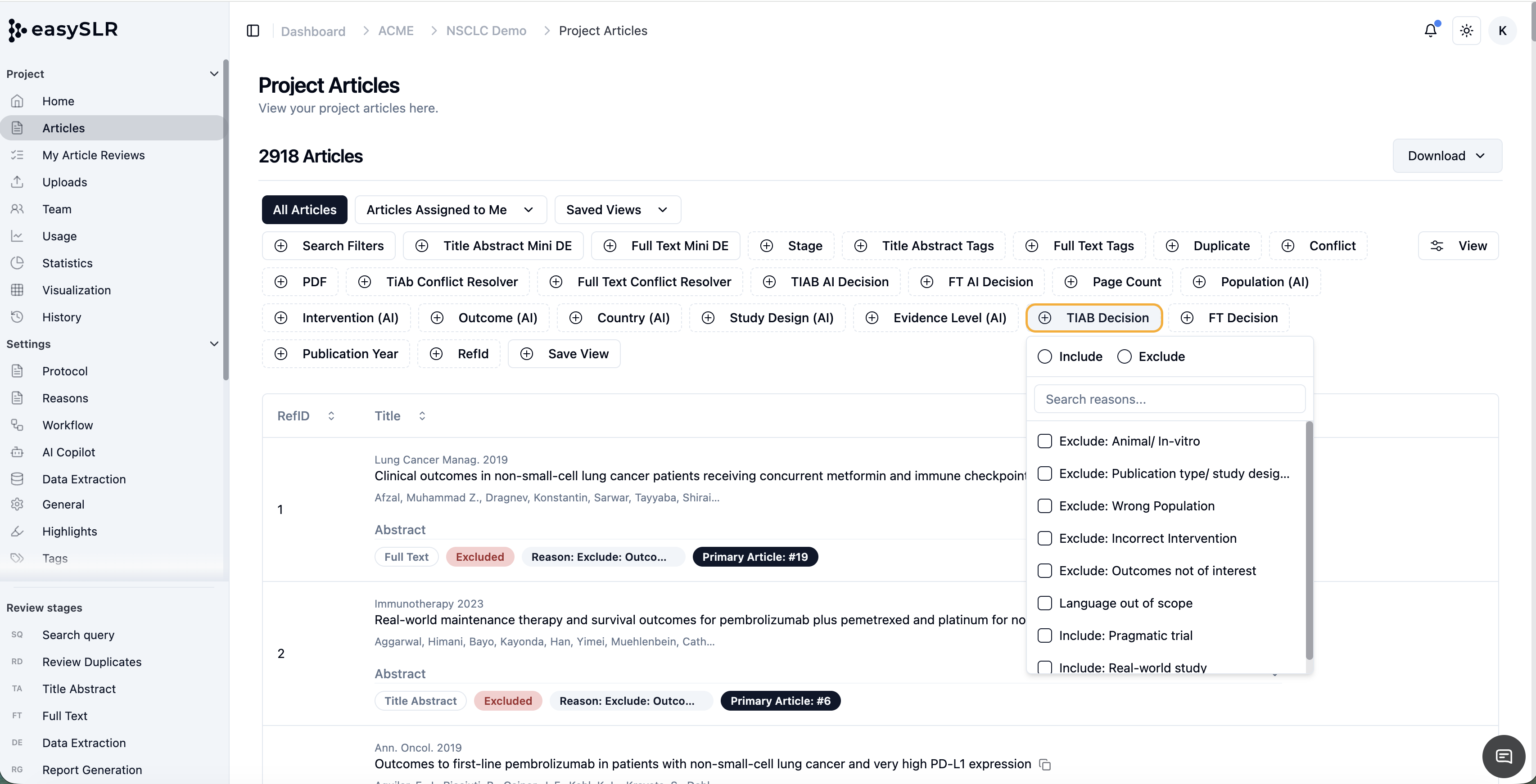
We’ve enhanced the Decision filter in EasySLR to provide a more streamlined and efficient filtering experience across both Title and Abstract (TiAb) and Full-Text (FT) screening stages.
What’s new?
Previously, users could filter articles only by their assigned Exclude Reasons. With this major update, articles can now also be filtered by their assigned Include Reasons.
We have also consolidated the previous Exclude Reasons filter into a single, unified Decision filter. Reviewers and project owners can now access the following options in one place:
Screening decisions
Inclusion Reasons
Exclusion Reasons
The unified filter is available for both the TiAb and FT decisions, providing a consistent experience throughout the review workflow.
A major improvement for quality control
This update is particularly valuable during QC. Project owners can quickly find and review all articles assigned a specific Include or Exclude Reason, without manually checking individual records.
This makes it easier to:
Confirm that screening criteria have been interpreted correctly
Identify inconsistent or incorrectly assigned reasons
Review records associated with a particular decision
Maintain consistency across reviewers and screening stages
Focus QC efforts on specific article groups
Key improvements
Filter articles by Inclusion Reasons
Users can now instantly identify all articles assigned a particular Include Reason—functionality that was not previously available.
One unified Decision filter
Screening decisions, Inclusion Reasons, and Exclusion Reasons are now grouped within a single filter, eliminating the need to navigate between separate filtering options.
Available at both screening stages
The enhanced filter can be used for both TiAb and FT decisions, enabling teams to apply the same approach throughout the review.
Faster article identification
Quickly locate articles associated with a specific decision or reason without reviewing records individually.
More efficient and targeted QC
Project owners can group articles by their assigned reasons and perform focused QC on the records most relevant to their review objectives.
Greater screening oversight
Reviewers and project managers gain a clearer view of how articles have been classified, making it easier to identify records that may need reassessment.
How it works
Navigate to the relevant article list at the TiAb or FT screening stage.
Click on the Decision filter.
Select a screening decision, Include Reason, or Exclude Reason.
Apply the filter to display articles matching the selected option.
Why this matters
As projects progress, manually locating articles assigned a particular screening reason can be time-consuming and inefficient. Previously, filtering was limited to Exclusion Reasons, making it difficult to review included articles associated with a specific rationale.
By adding Inclusion Reason filtering and combining all screening decisions and reasons into one unified filter, EasySLR enables teams to perform faster, more focused QC, validate classifications, identify inconsistencies, and maintain methodological rigour throughout the review process.