Track Active Background Jobs Directly from the Taskbar
We’ve enhanced background job tracking in EasySLR, making it easier to see which tasks are currently running and access their details.
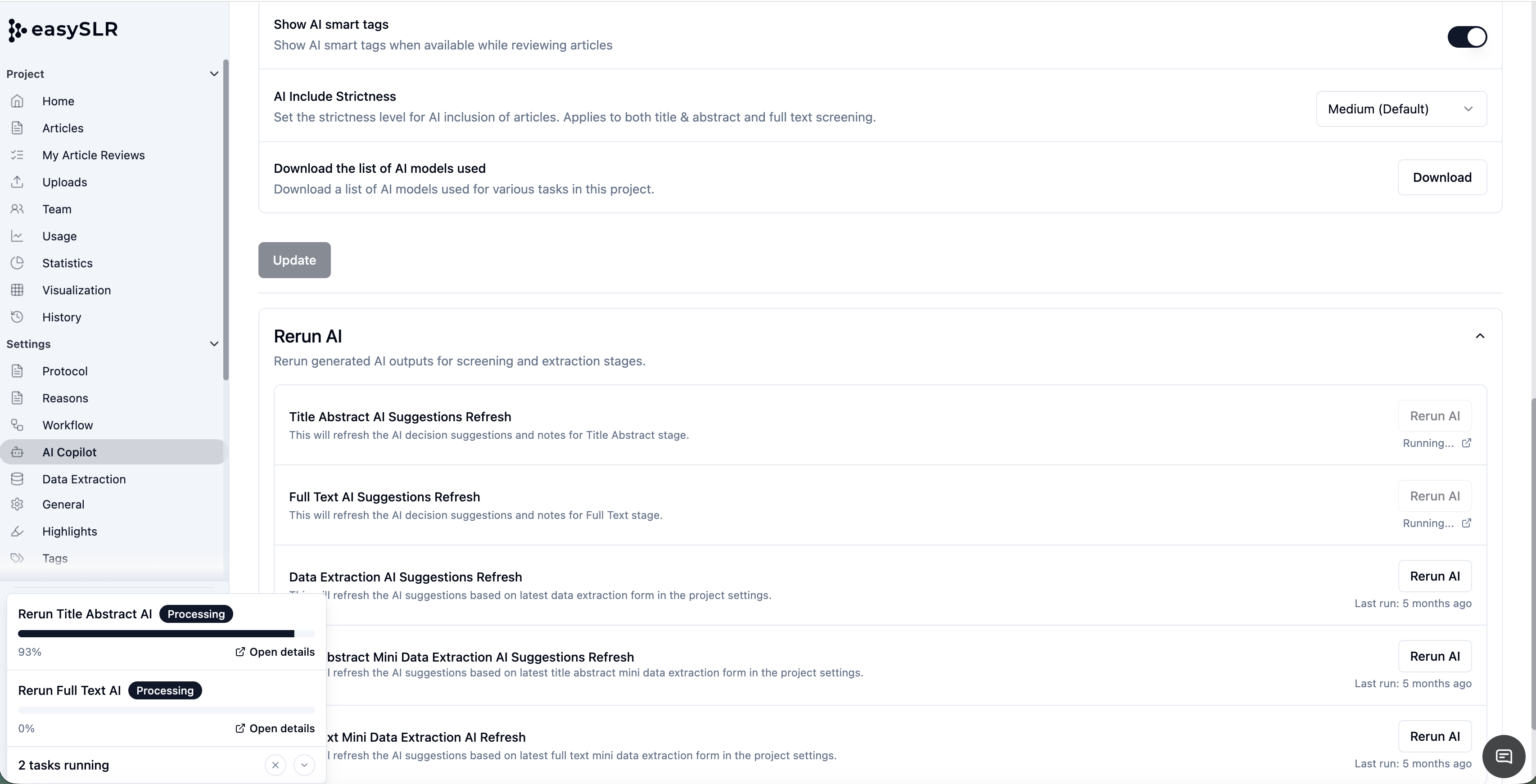
The taskbar on the screen now displays active background jobs, providing a central view of ongoing processes. Users can also click an active background job to navigate directly to the relevant task details.
What’s new?
Previously, background jobs continued running without providing users with an easy way to track their progress, requiring them to navigate to the relevant page for updates. With this enhancement, users can monitor active jobs directly from the taskbar and click the associated notifications to view more information, without leaving their current screen.
Key improvements
View active tasks from the taskbar
The taskbar displays background jobs that are currently running, giving users a clear overview of ongoing activity.Access task details directly
Click an active background job notification to open the relevant details and better understand what is being processed.Track long-running processes
Monitor tasks that may take additional time to complete without needing to remain on the page where they were initiated.Check existing jobs before starting another
Quickly confirm whether a task is already in progress before initiating the same or a similar action.Navigate more efficiently
Instead of searching through different sections of a project, users can access information about an active task directly from its notification.
How it works
When an EasySLR activity runs in the background:
The task appears in the taskbar as an active background job.
A progress bar indicates that the process is currently running.
Users can click the active task to view the relevant details.
Why this matters
Some EasySLR tasks continue running in the background and may take time to complete. Previously, users might have been unsure whether a task was still processing, completed, or needed to be initiated again.
The enhanced taskbar provides greater transparency into background activity. Users can quickly see what is running, access the relevant details, and track progress.
This update creates a clearer and more efficient experience for managing ongoing tasks across EasySLR projects.