Stage-Wise Reviewer & AI Configuration
We've introduced a major enhancement to Workflow and AI Copilot settings in EasySLR, providing significantly greater flexibility in how screening workflows are configured and managed.
Users can now independently configure reviewer requirements and AI behavior at each stage of the review process, enabling workflows that more closely align with project methodologies and team preferences.
This enhancement makes it easier to design review processes that balance reviewer effort, AI involvement, quality control, and efficiency.
What's New?
Independent Reviewer Requirements by Screening Stage
Previously, reviewer requirements were managed through a single setting across the screening workflow.
With this update, reviewer requirements can now be configured separately for:
Title & Abstract Screening
Full-Text Screening
This allows teams to define different review requirements at each stage based on project complexity and methodology.
Examples include:
Single review at Title & Abstract Screening and dual review at Full-Text Screening
Dual review at Title & Abstract Screening and single review at Full-Text Screening
AI-assisted workflows with different reviewer requirements at each stage
Why This Matters
Different stages of the review process often require different levels of scrutiny.
For example:
Title & Abstract Screening may involve a larger volume of records where only one vote may be required.
Full-Text Screening may require additional reviewer oversight.
The new configuration provides the flexibility to tailor reviewer requirements to each stage rather than applying a single rule across the entire workflow.
Enhanced AI Copilot Configuration
AI controls have also been redesigned to support independent stage-wise configuration.
Users can now configure AI separately for:
Title & Abstract Screening
Full-Text Screening
Data Extraction
Mini Data Extraction
This provides much greater flexibility in determining where and how AI participates throughout the review process.
Configure AI Differently at Each Stage
Previously, AI configuration was more tightly coupled across the workflow.
Now users can independently choose how AI behaves at each stage.
Examples include:
AI Assistant during Title & Abstract Screening
AI Reviewer during Full-Text Screening
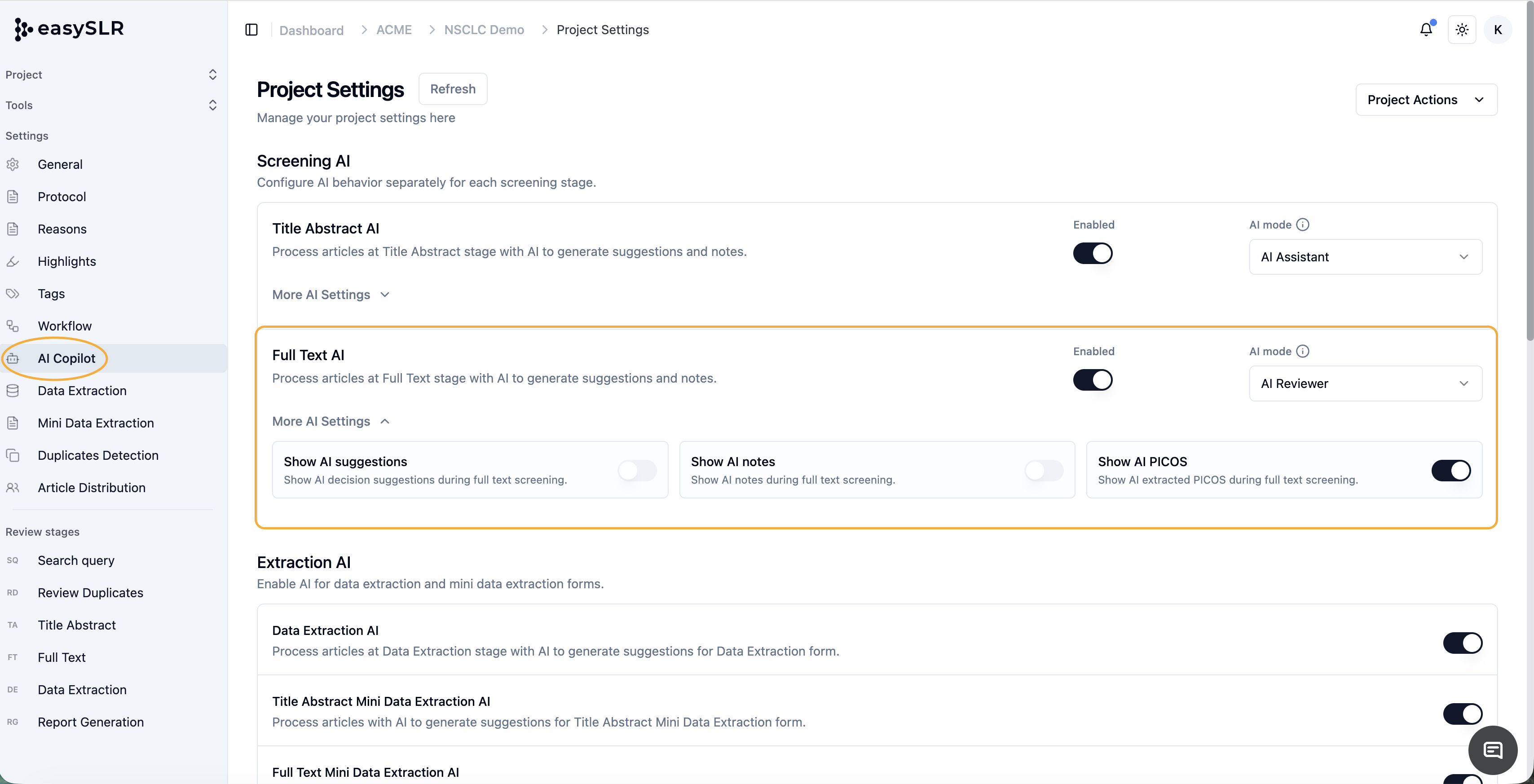
This enables teams to adopt AI only where it delivers the most value.
Multiple AI Participation Modes
For each stage, users can now independently choose between:
AI Assistant
AI provides:
Suggestions
AI Notes
PICOS extraction
Supporting rationale
while human reviewers remain responsible for final decisions.
AI as One of the Reviewers
AI acts as an independent reviewer alongside human reviewers.
This is particularly useful for:
Dual-review workflows
Quality control processes
Reviewer agreement assessments
AI as the Only Reviewer (Where Applicable)
AI can also be configured to independently review records without requiring human reviewer decisions at that stage.
This can significantly accelerate screening workflows where automation is preferred.
Key Benefits
Greater Workflow Flexibility: Configure different reviewer requirements and AI behaviour at each stage of the review process.
Better Alignment with Review Methodology
Support a wider range of workflows, including:
Single-review workflows
Dual-review workflows
AI-assisted reviews
AI reviewer workflows
Hybrid review models
Enhanced Quality Control
Configure AI Reviewer functionality at selected stages to provide additional review oversight and consistency.
Increased Efficiency
Reduce reviewer workload by tailoring both reviewer requirements and AI involvement according to project needs.
Example Workflow Configurations
Example 1: AI-Assisted Screening
Title & Abstract Screening
1 Reviewer
AI Assistant Enabled
Full-Text Screening
2 Reviewers
AI Assistant Enabled
Example 2: AI Reviewer Workflow
Title & Abstract Screening
2 Reviews Required
AI Reviewer Enabled
Full-Text Screening
2 Reviews Required
Human Reviewers Only
AI Assistant Enabled
Example 3: Hybrid Workflow
Title & Abstract Screening
AI Assistant
Full-Text Screening
AI Reviewer
This flexibility allows teams to build workflows that best fit their review objectives and resource availability.
Summary
The new Stage-Wise Reviewer & AI Configuration enhancement provides complete control over how reviews are conducted throughout the EasySLR workflow.
By allowing reviewer requirements and AI behaviour to be configured independently at each stage, teams can build more efficient, flexible, and methodologically appropriate review workflows while maximising the benefits of AI-assisted evidence synthesis.