Search Query Generation
We’re excited to announce the Search Query Generation Tool — an intelligent assistant designed to help you create ready-to-use PubMed search strategies in just a few clicks. This feature saves valuable researcher time by automating query construction while ensuring your search is comprehensive, structured, and aligned with your PICOS framework.
Why Use the Search Query Generator
Build structured PubMed queries instantly — no manual drafting required.
Ensure all key PICOS terms (Population, Intervention, Comparator, Outcomes, Study Design) are included.
Quickly adapt your search strategy for new research topics.
Validate recall and relevance using known Key Articles.
How It Works
Access the Tool: Go to the Tools section and select Search Query Generator.
Add Research Objective: Enter your research question — the system automatically identifies and structures PICOS terms.
Validate Terms: Use the Validate option to confirm all PICOS elements are correctly represented.
Select Target Article Range and Add Key Articles to maximize recall and relevance.
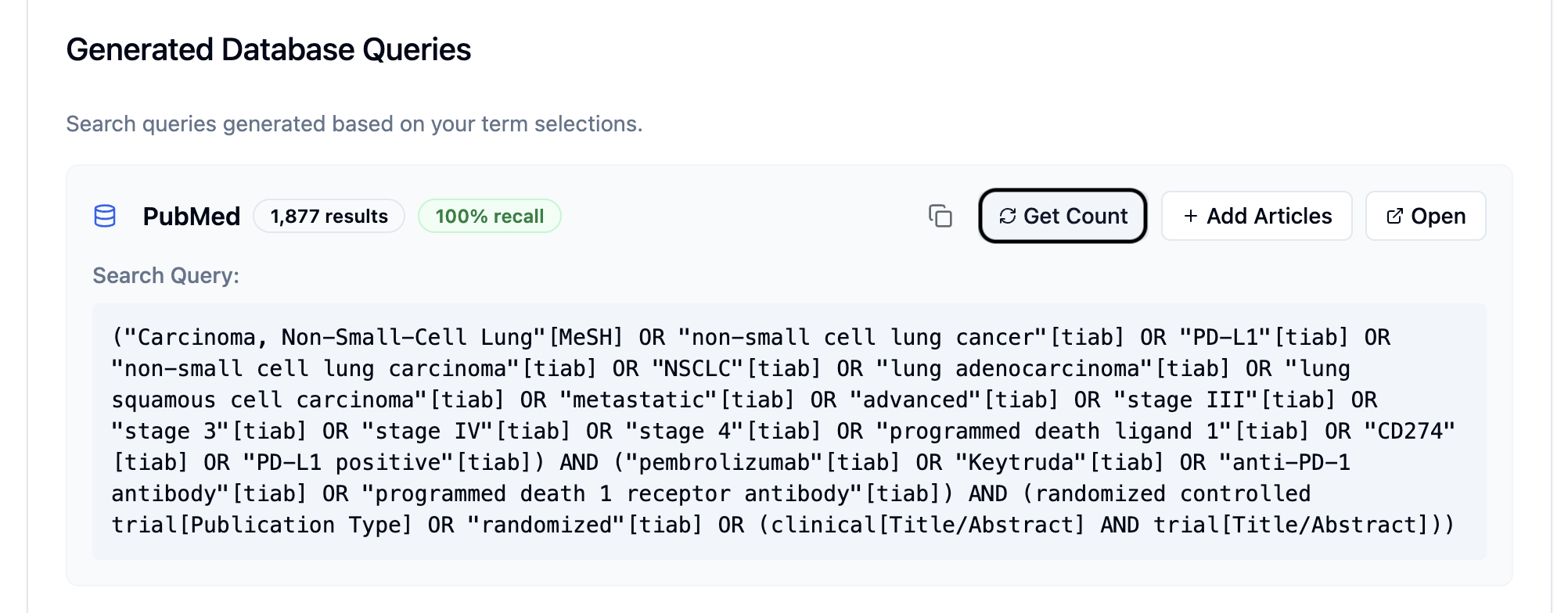
Generate and Refine: The AI will create a detailed PubMed search string, which you can further refine or customise.
Run and Import: Use the Get Count option to preview results, and Add Articles to import directly from PubMed into EasySLR.
Additional Capabilities
Regenerate Query – Generate alternate search strategies with one click.
Copy Query – Duplicate or store your finalised search string for documentation.
Publication Year Filter – Restrict your search to specific publication ranges.
NBIB Import Support – For large result sets (>10,000), download and upload NBIB files easily.
Benefits
Eliminates time-consuming manual query creation.
Maintains consistency using the PICOS framework.
Improves recall and precision by leveraging Key Articles.
Fully integrated with PubMed for direct import into your project.