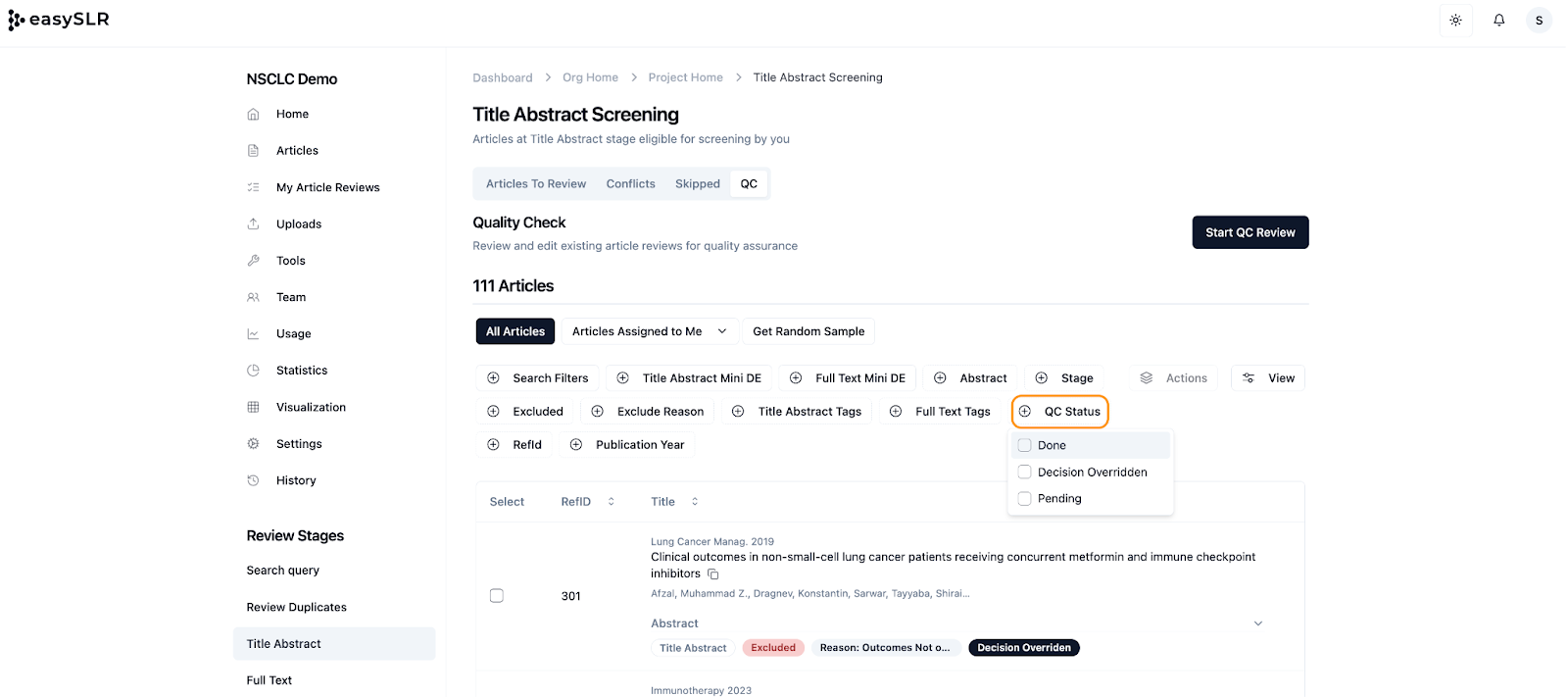
QC Status Filter Added
A new QC Status Filter has been introduced in the QC section to help users quickly categorize and review records based on their quality check progress.
This enhancement improves visibility, tracking, and reporting within the Quality Control workflow.
What’s New
The QC Status filter allows you to:
Identify records by QC progress
Monitor pending quality checks
Track overridden decisions
Improve audit transparency
Available QC Status Options
The filter includes:
Done – Displays records where the quality check has been completed
Decision Overridden – Displays records where the original reviewer decision was modified during QC
Pending – Displays records awaiting quality check
Where to Access
The QC Status Filter is available in:
Title Abstract Screening → QC tab
Full-Text Screening → QC tab
Why This Matters
This enhancement helps teams:
Track QC completion status more efficiently
Identify overridden decisions quickly
Monitor pending reviews without manual sorting
Strengthen reporting and audit readiness
The QC Status Filter streamlines quality control management across screening stages in EasySLR.