PubMed Advanced Query Builder
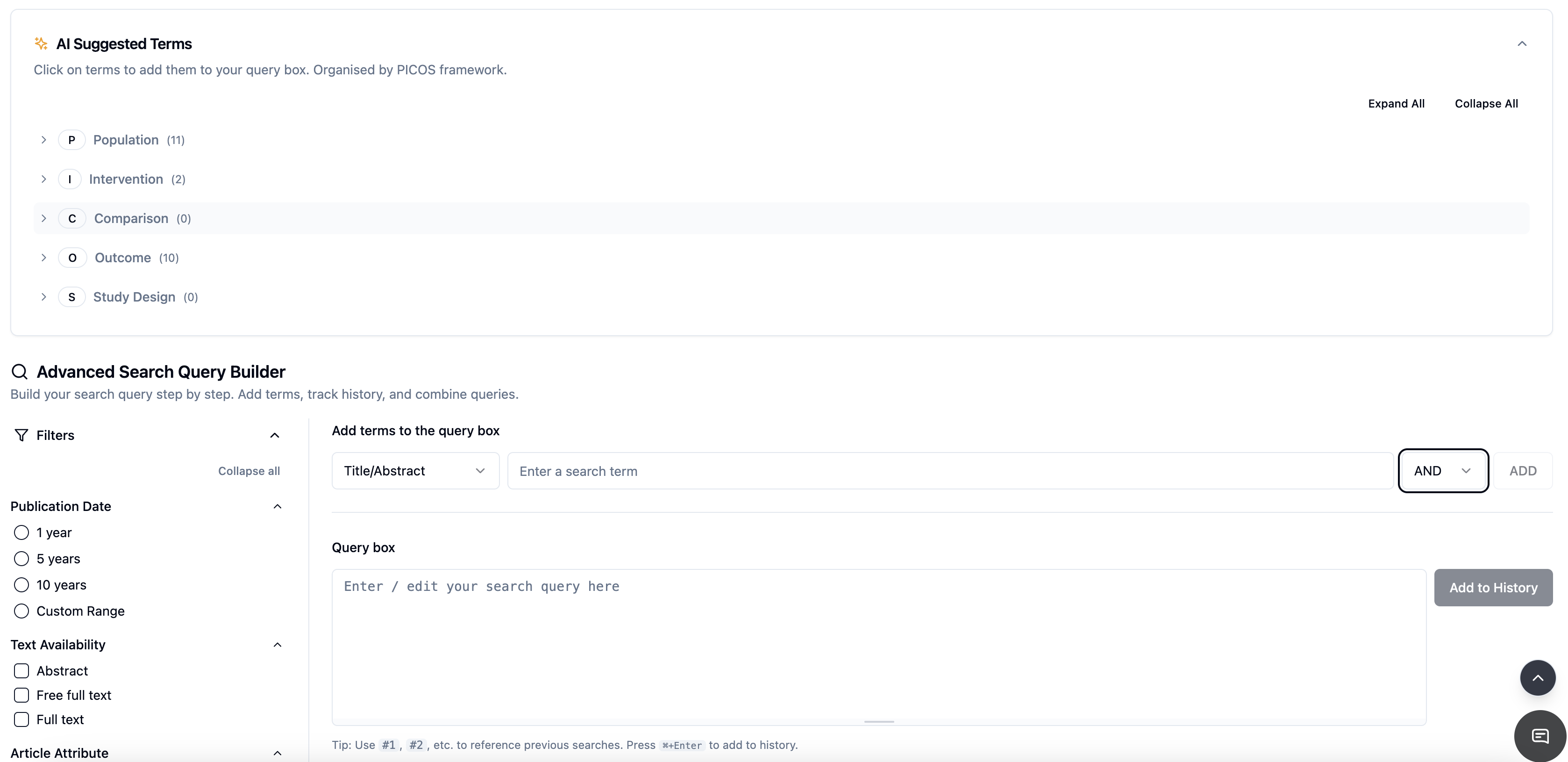
EasySLR now includes the Advanced Query Builder for PubMed, designed to help researchers create structured, transparent, and reproducible search strategies using a full-featured query interface. The tool replaces the basic PICOS editor with a more flexible system that enables real-time query construction, result validation, and structured documentation of search development.
Overview
The Advanced Query Builder helps systematic reviewers develop and refine search strategies for PubMed using a structured interface inspired by the PubMed advanced search experience.
The tool allows users to build queries using the PICOS framework, preview query logic instantly, retrieve live result counts, and track multiple search iterations. This ensures the search development process remains traceable, reproducible, and audit-ready.
Key Capabilities
Structured PICOS-Based Query Building
Organize search terms using the PICOS framework, including:
Population
Intervention
Comparison
Outcome
Study Design
Reviewers can add terms under each category and construct queries using Boolean operators.
To add a term:
Select the search field (e.g., Title/Abstract)
Enter the search term
Choose a Boolean operator (AND / OR)
Click Add
The system automatically generates the structured query logic.
Real-Time Query Preview
The generated PubMed query appears instantly in the Query Box, allowing reviewers to:
Edit the query manually
Combine search lines
Reference previous search steps (e.g.,
#1,#2)Adjust Boolean operators
This provides full flexibility while maintaining structured query development.
Live Result Count
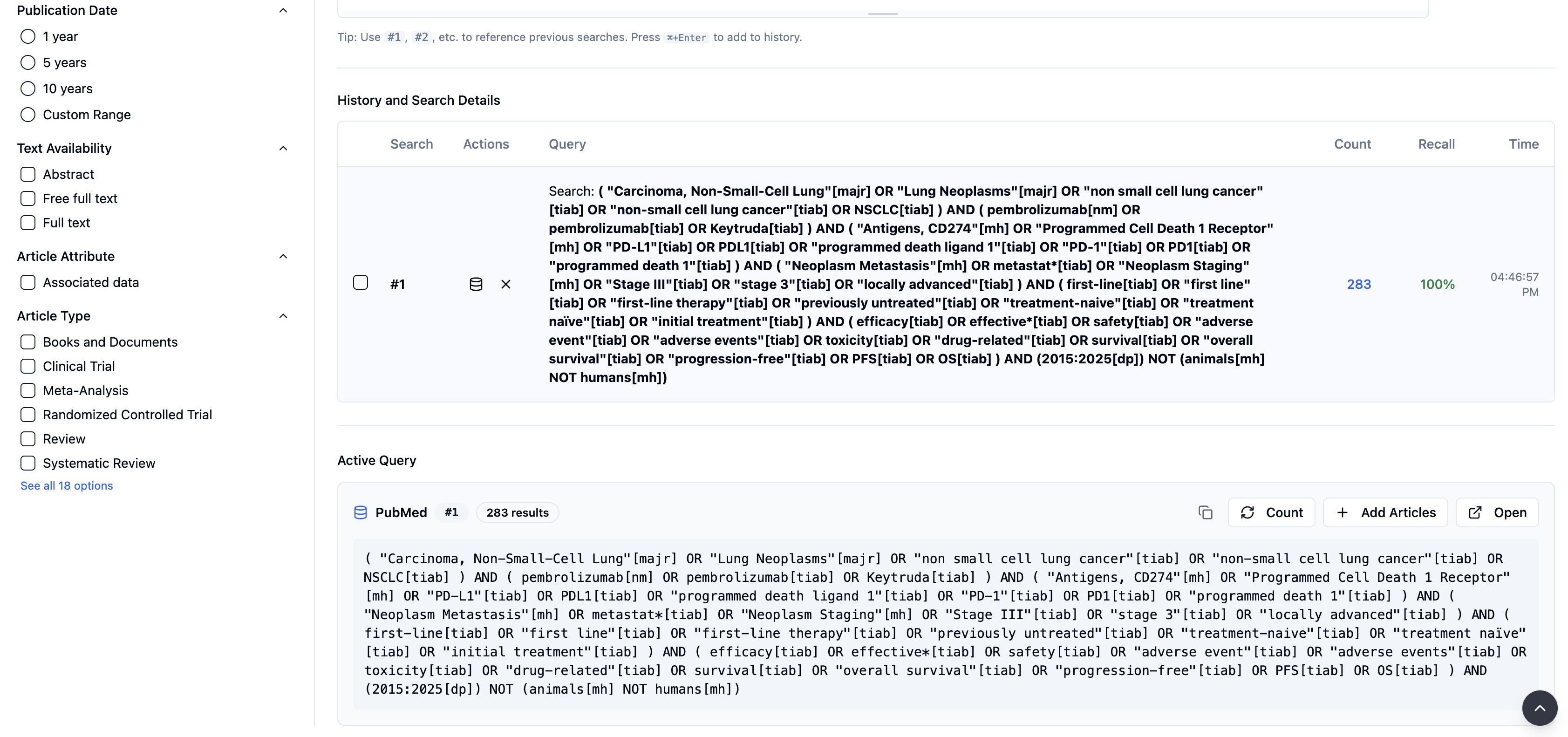
The Count option retrieves the live number of results directly from PubMed.
This helps reviewers:
Estimate screening workload
Adjust search scope
Refine Boolean logic
Identify overly broad or restrictive queries
Run the Query in PubMed
The Open option allows users to run the generated query directly in PubMed.
This enables reviewers to:
Validate results externally
Export citations
Confirm search behavior within PubMed.
Built-In Search Filters
The Filters Panel helps refine search results before finalizing the strategy.
Available filter options include:
Publication Date (1 year, 5 years, 10 years, or custom range)
Text Availability (Abstract, Free Full Text, Full Text)
Article Type
Article Attributes
Filters are organized into collapsible groups for easier navigation.
Reviewers should apply filters carefully to avoid unintended exclusions that may reduce recall.
Search History Tracking
Each time a query is executed, EasySLR automatically stores:
Query string
Result count
Recall (when applicable)
Timestamp
Key details:
Up to 20 search iterations are stored
Search history persists across sessions
Data is stored securely within background job metadata
This enables reviewers to:
Compare multiple search strategies
Track improvements in recall
Maintain documentation for audit and reporting.
Background Job Detail Panel
The job detail section is collapsible, allowing users to:
Reduce interface clutter
Focus on query results
Review search performance more easily.
Best Practices
To get the best results when using the Advanced Query Builder:
Compare multiple search iterations before finalizing
Check live result counts after modifying Boolean logic
Broaden terms if recall appears too low
Apply filters cautiously
Run the query in PubMed for external verification
Document the final query and result count in your protocol.
Benefits
The Advanced Query Builder helps teams:
Improve search transparency
Strengthen methodological reproducibility
Track search evolution automatically
Reduce manual documentation effort
Create protocol-ready search documentation
This feature ensures that PubMed search development within EasySLR remains structured, traceable, and methodologically rigorous.