Improved Visibility in Background Tasks
We've enhanced the Background Tasks experience in EasySLR by making the failure reasons more visible, easier to understand, and simpler to resolve.
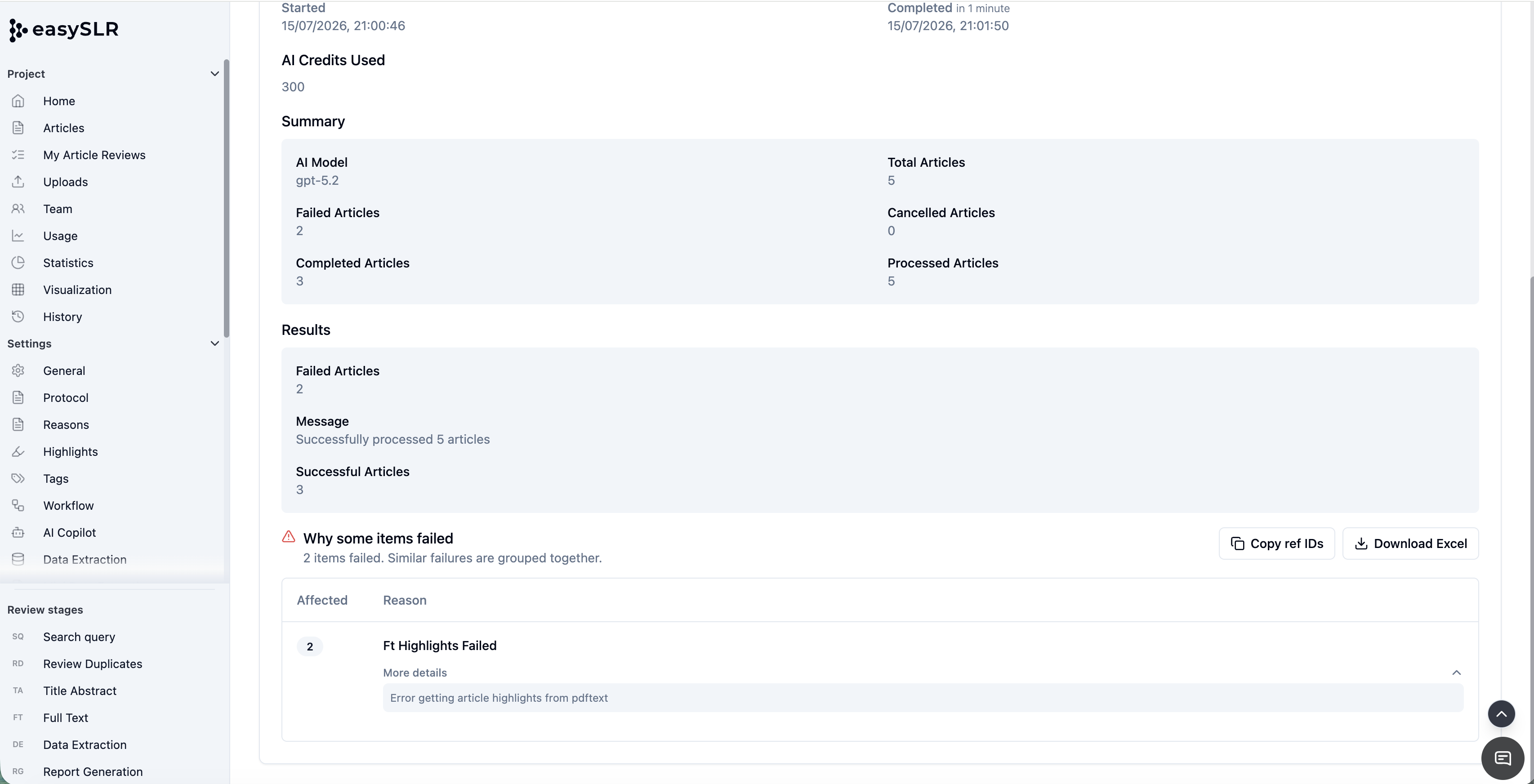
Previously, if a background task failed, users had limited visibility into what went wrong. With this update, failed tasks now provide detailed information, allowing users to quickly identify the affected articles, understand the reason for the failure, and take corrective action.
What's New?
Background Tasks now provide enhanced reporting whenever a task cannot be completed successfully.
In addition to displaying the task status, EasySLR now allows users to:
View detailed messages for failed tasks.
Identify exactly which articles were affected.
Download a complete error report in Excel for easier troubleshooting and bulk corrections.
Article-Level Error Visibility
When a background task encounters an issue, EasySLR now identifies the individual articles that could not be processed successfully.
This makes it much easier to isolate problematic records instead of having to review the entire dataset.
Download Report
Users can now download an Excel report containing all failed articles along with the corresponding reason for failure.
The report can be used to:
Review failed records offline.
Identify patterns across failures.
Make the required corrections.
Re-upload or rerun processing only for the affected articles.
This significantly reduces the time required to diagnose and resolve processing issues.
Clearer Messages
Background Tasks now display more descriptive messages, making it easier to understand the underlying cause of a failure.
Examples include issues related to:
File validation
AI processing
PDF retrieval
Import or export operations
Configuration settings
System or connectivity issues
Faster Troubleshooting
Improved visibility allows users to resolve issues without repeatedly rerunning the same task.
By knowing exactly which articles failed and why, users can make targeted corrections before initiating another run.
Summary
The enhanced Background Tasks experience provides greater transparency by identifying failed articles, displaying detailed error messages, and allowing users to download an Excel report containing the affected records and reasons for failure. These improvements make troubleshooting significantly faster, reduce manual effort, and provide a smoother experience when working with AI processing, imports, exports, and other background operations in EasySLR.