CustomID-Based Bulk Upload for Supplementary Files
EasySLR now supports CustomID-based bulk upload of supplementary files, allowing teams to link additional materials (e.g., appendices, datasets, supplementary tables) to their corresponding articles using their own unique identifiers.
Overview
Managing supplementary files alongside primary PDFs can be complex—especially when teams rely on internally defined identifiers instead of RefIDs.
With this update, EasySLR enables bulk upload using CustomID matching, ensuring that supplementary files are automatically linked to the correct articles based on your project’s naming convention.
This enhancement provides greater flexibility while maintaining efficiency and accuracy across workflows.
What’s New
1. CustomID-Based File Matching
Supplementary files can now be matched using CustomID naming conventions
Automatically links files to the correct article during upload
Supports projects using external IDs or internal tracking systems
👉 Example:
ABC123_appendix.pdf → Linked to article with CustomID ABC123
2. Bulk Upload Support
Upload multiple supplementary files in a single batch
Ideal for large-scale reviews with multiple files per study
Minimises repetitive manual uploads
3. Support for Multiple Files per Article
Attach multiple supplementary documents to a single study
Useful for:
Appendices
Supplementary tables
Additional figures
Protocols or supporting documents
4. Improved File Organisation
Supplementary files are automatically grouped under their respective articles
Easily accessible during:
Full-text screening
Data extraction
Enhances navigation and document management
5. Clear Upload Status & Visibility
Easily identify:
Successfully matched files
Unmatched files
Allows quick resolution before finalising uploads
6. Seamless Workflow Integration
Works alongside existing CustomID-based PDF upload workflows
Ensures consistency across all document types
No changes required to existing project setup
How It Works
Prepare supplementary files in a local folder
Rename files using the CustomID format
Example: ABC123_supplementary_table.pdf
Navigate to:
Uploads → Full-Text → Using ID → Upload → Select Supplementary Upload
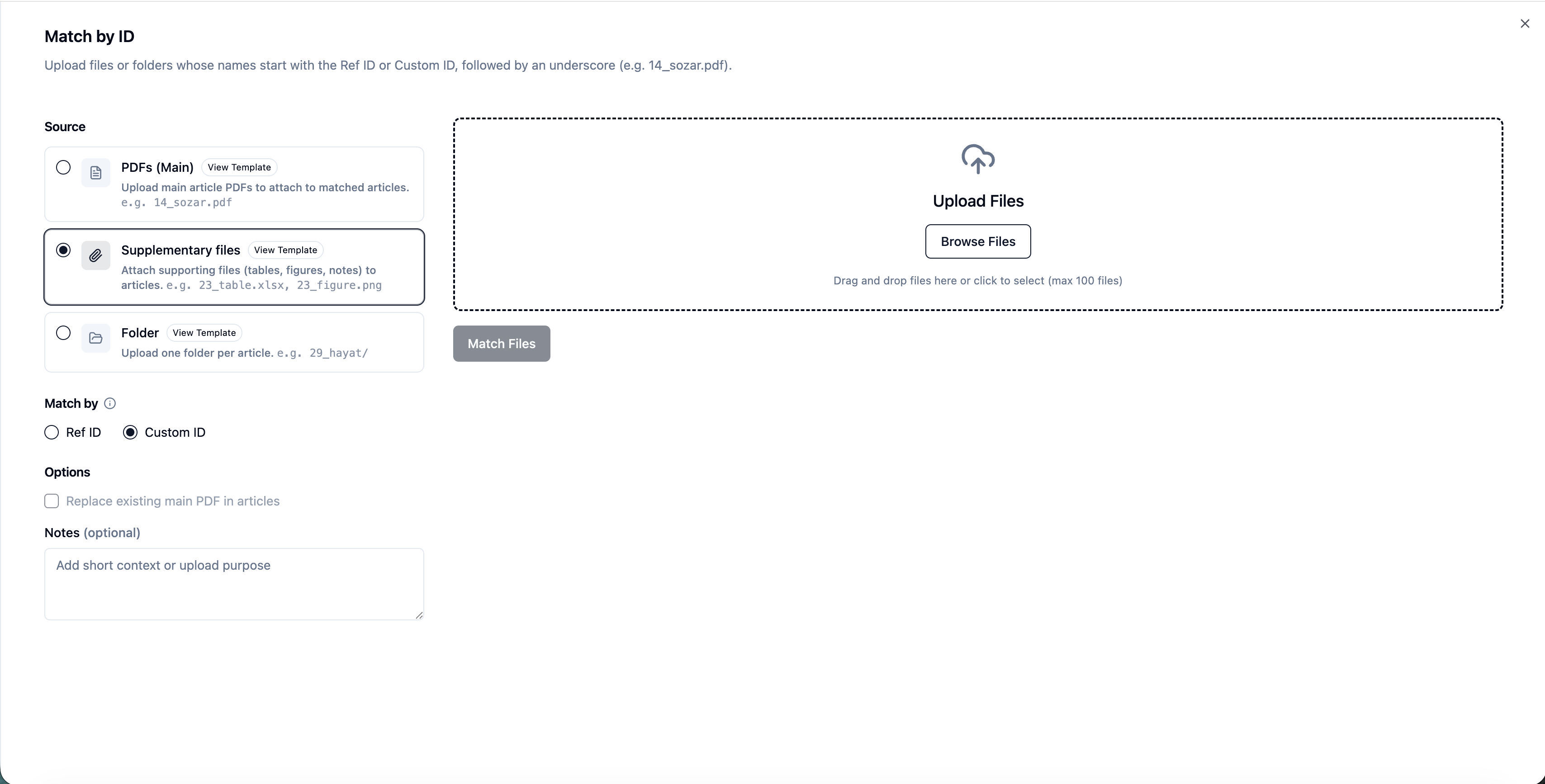
Upload files in bulk
EasySLR will automatically:
Match files using CustomID
Link them to the corresponding articles
Why This Matters
This feature helps teams:
Use their preferred or existing ID systems
Avoid manual mapping of supplementary files
Improve accuracy in document linking
Keep all study-related materials organised in one place
Scale workflows efficiently for large or complex projects
Important Notes
CustomID in file names must exactly match the CustomID in the project
Files without matching CustomIDs will be flagged as unmatched
Manual upload remains available for unmatched files