Bulk RefID Copy-Paste from Excel
We’ve made it easier to work with RefIDs in EasySLR by introducing bulk copy-paste functionality directly from Excel.
What’s New
Bulk RefID Input via Copy-Paste
You can now copy a list of RefIDs from Excel and paste them directly into EasySLR- no need to enter them one by one.
Faster Article Selection & Actions
Quickly use pasted RefIDs to locate, filter, or take actions on multiple records at once.
Key Benefits
Saves time by eliminating manual entry
Simplifies bulk operations
Enables quick identification of specific records
Improves workflow efficiency during screening and management
How to Use
Copy the list of RefIDs from your Excel sheet
Go to the relevant section in EasySLR
Click on RefID filter and select Bulk IDs
Paste the RefIDs into the input field
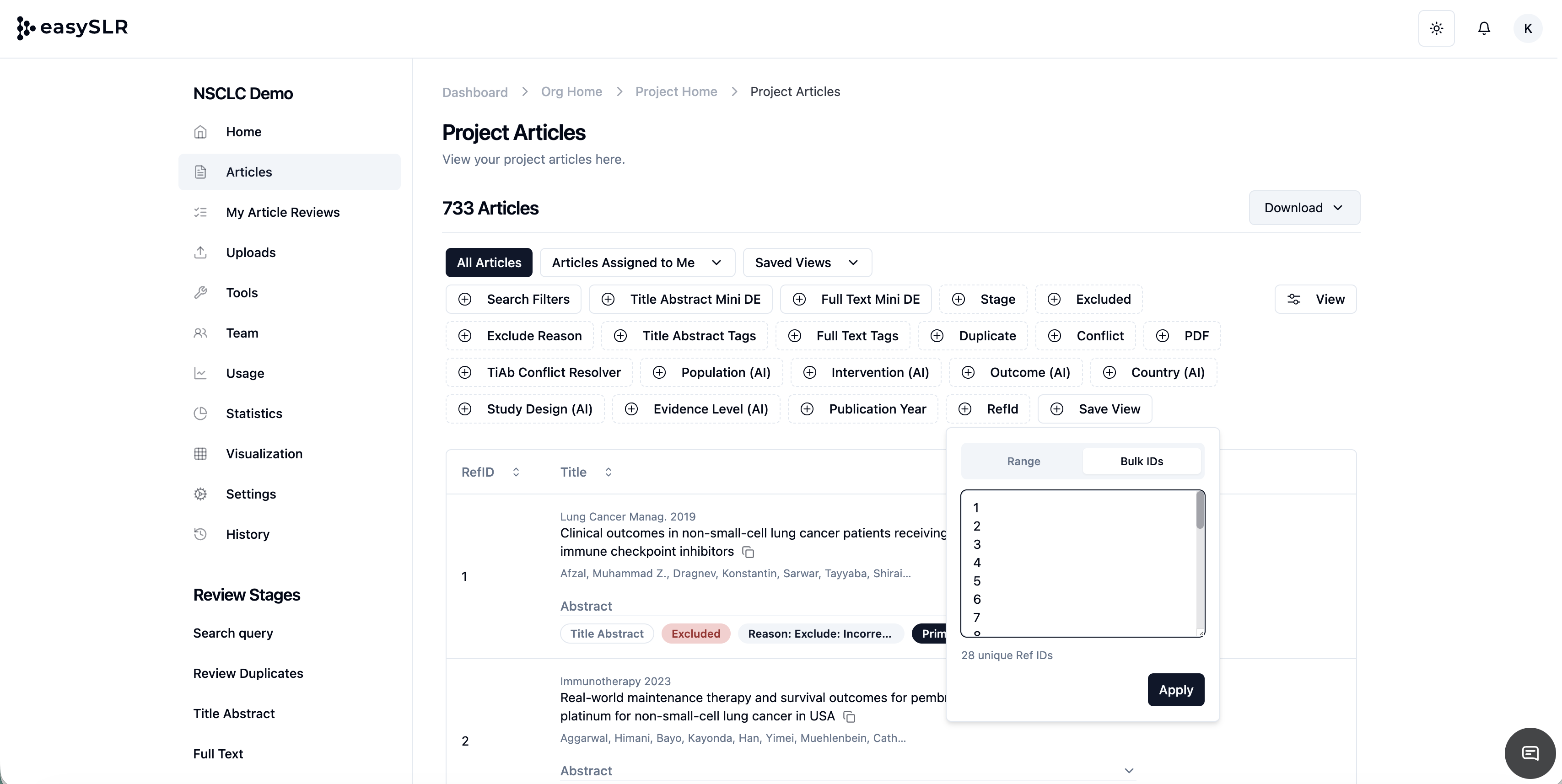
Click Apply
You will get the list of entered RefIDs
Use Cases
Filtering a predefined set of studies
Revisiting specific articles for QC or validation
Applying bulk actions on selected records