Auto Fetch PDF Setting – More Control Over PDF Retrieval
We’ve introduced a new Auto Fetch PDF setting in EasySLR, giving teams greater flexibility in how PDFs are managed within projects.
What’s New?
Users can now choose whether they want EasySLR to automatically fetch PDFs for imported citations.
How It Works
When Auto Fetch PDF is Enabled
EasySLR will automatically begin fetching available PDFs for all articles in the project, helping teams quickly move into the full-text screening stage.When Auto Fetch PDF is Disabled
EasySLR will not attempt to retrieve PDFs automatically, allowing teams to manage PDF uploads manually or use their preferred workflow.
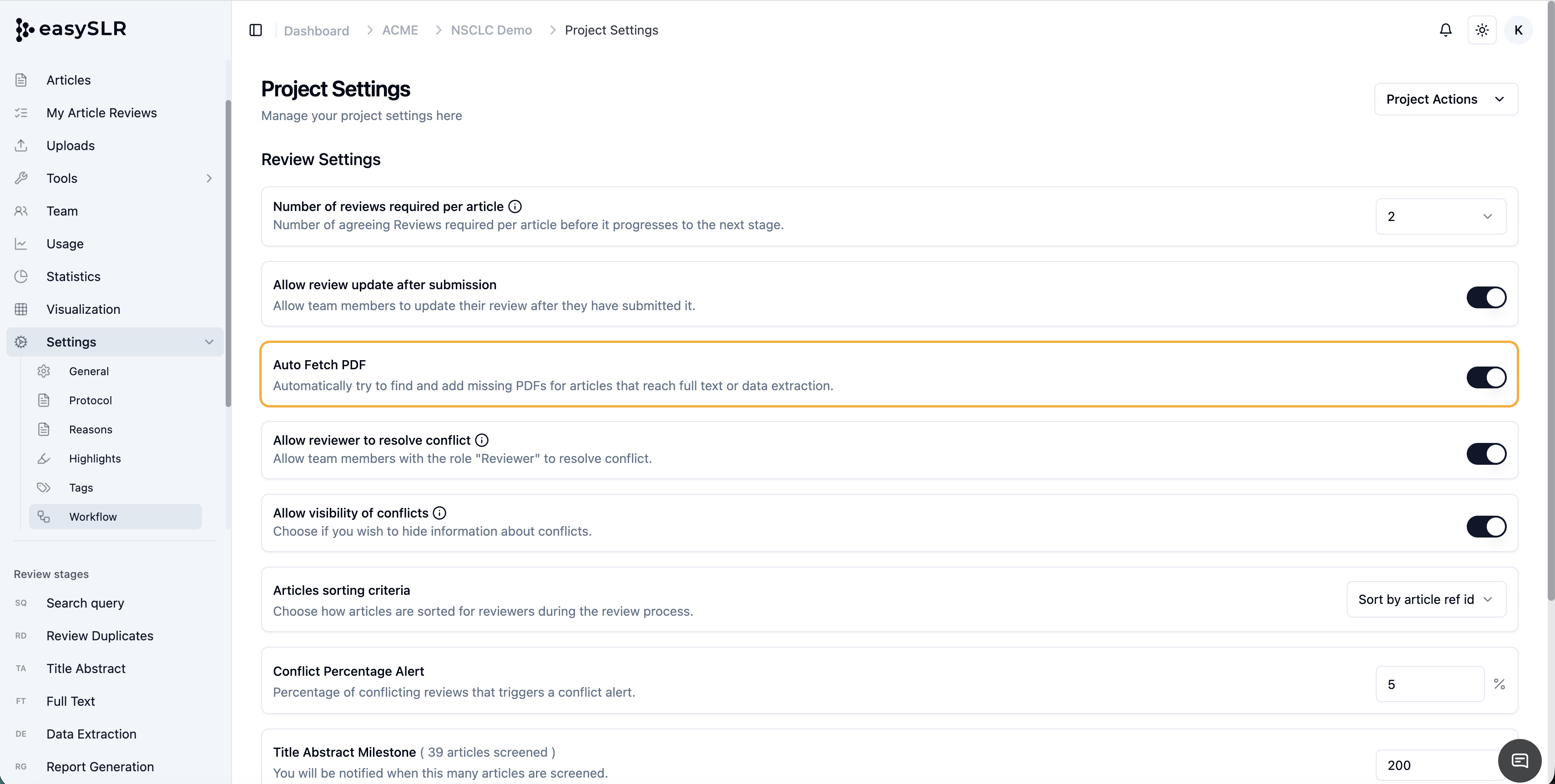
How to Enable or Disable Auto Fetch PDF
Step 1: Open Project Settings
Step 2: Navigate to Workflow Section
Step 3: Locate the “Auto Fetch PDF” Setting
Step 4: Choose Your Preferred Workflow
Key Benefits
Greater control over PDF management workflows
Flexibility to decide when the PDFs should be fetched
Reduced unnecessary PDF retrieval for projects where automatic retrieval is not required
Faster access to full-text articles when enabled
This update allows teams to better align PDF retrieval behaviour with their internal review processes and project requirements.