Archive Project
We’re excited to introduce Project Archiving — a new feature designed to help you declutter your workspace and keep your active project list organized. With this update, completed or inactive projects can be archived without losing any data, making it easier to focus on ongoing work.
Key Highlights
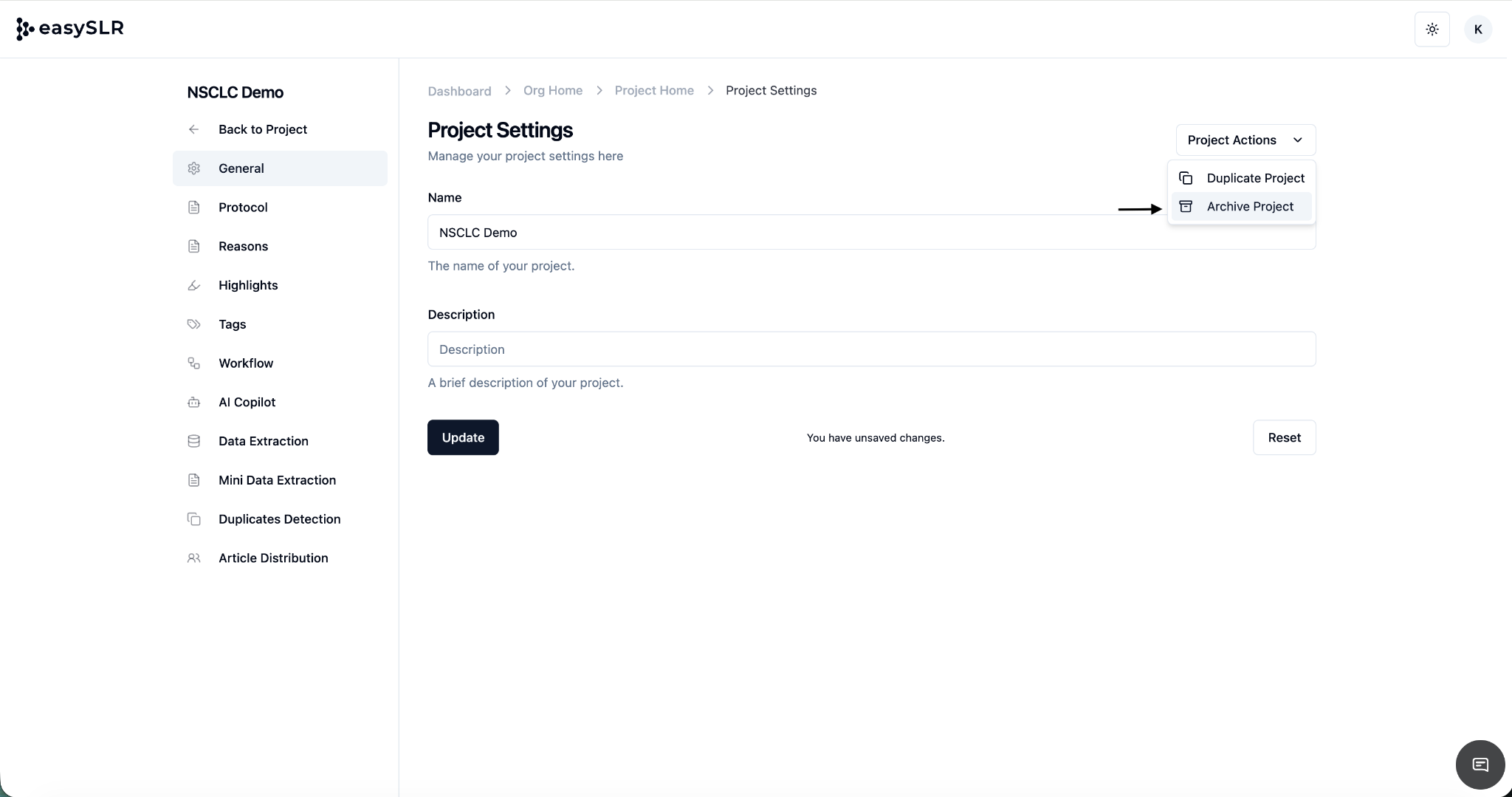
Archive Projects Easily
Move completed or inactive projects out of your active list with just a few clicks.
Archived projects are clearly labeled for easy identification.
Access Archived Projects Anytime
All archived projects remain fully accessible in the Archived Projects section, allowing you to review or reference past work whenever needed.
Restore Projects When Needed
Reactivate any archived project by simply selecting Unarchive Project in the Project Settings. The project will return to your active list seamlessly.
Permissions & Safety
Only Owners and Lead Reviewers can archive or unarchive projects.
Archiving a project does not delete any data — all information remains intact and traceable.
Why This Matters
This feature helps teams:
Reduce clutter and keep the active workspace focused on ongoing reviews
Improve productivity by separating completed work from active projects
Preserve data integrity while safely storing past projects
Easily revisit or restart previously completed reviews without rebuilding them
This feature ensures better workspace organization and project management, giving you more control over your systematic review workflow.