A Clearer View of Your PubMed Search Strategy
PubMed query generation now saves individual PICOS query elements alongside the final combined query. This makes it easier to inspect your search terms, reuse individual elements, and combine the concepts relevant to your review.
What’s new?
Individual PICOS elements: Review the search terms for Population, Intervention, Comparator, Outcomes, and Study Design separately.
Copy and combine elements from History: Inspect individual elements, copy their queries, and combine selected elements to build your search strategy.
Final query based on your selection: The combined query is composed from the elements you select and remains visible in the Active Query box.
Sequential numeric references: History entries use ordered numeric references, making it easier to identify elements and refer to them when combining queries.
Result counts for individual elements: Review how many PubMed results each element returns to help assess its breadth.
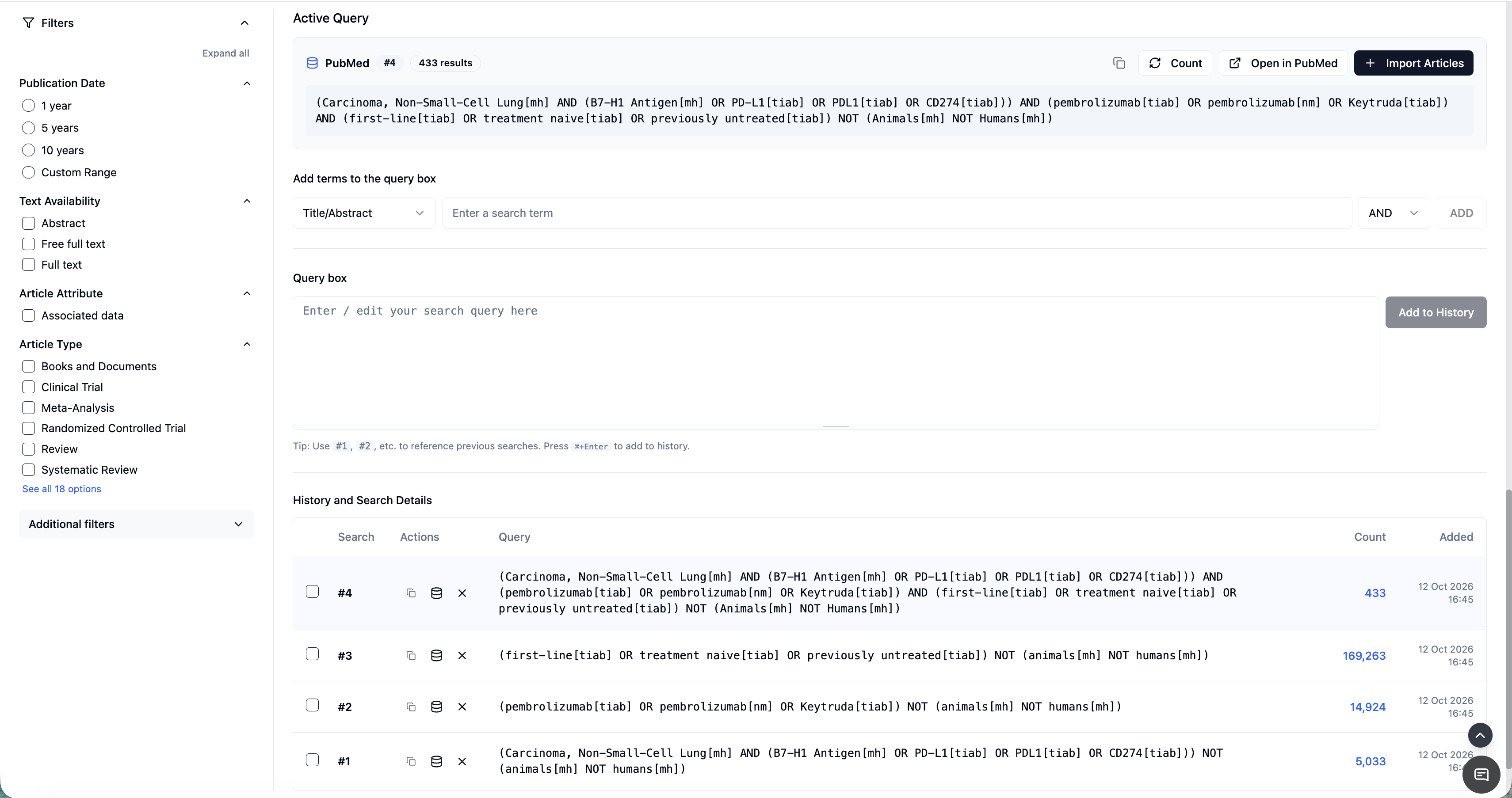
How this improves search strategy development
Identify gaps in terminology: Review keywords, synonyms, abbreviations, and subject headings within each element.
Check alignment with your protocol: Confirm that each concept reflects your review question and intended scope.
Understand search breadth: Use individual element counts to identify concepts that may be too broad or restrictive. These counts provide context; the combined query determines the final result set.
Make focused revisions: Identify which component needs attention without losing sight of the overall strategy.
Reuse relevant query elements: Copy individual elements for further refinement or combine selected elements for a different search.
Review Boolean logic: Inspect how alternative terms are grouped using OR and how selected concept groups are combined using AND.
Support team review: Discuss individual components with colleagues and use History to revisit earlier strategies.
Example: refining a search
For a review of a treatment for type 2 diabetes, you can inspect the Population element for condition terms and the Intervention element for treatment names and synonyms.
Reviewing each element’s result count can help you spot an unexpectedly narrow or broad concept. You can then choose which elements to combine and review the resulting query in the Active Query box.
If the combined search returns too few results, examine whether an outcome or comparator element is unnecessarily restricting the search.
Choose the elements that suit your review
Not every PICOS element needs to appear in the final query. Comparator, outcome, or study-design terms can sometimes make a search too restrictive.
The separate elements help you decide which concepts to include in the search and which to assess during screening. The final query should still be reviewed for appropriate terminology and Boolean grouping.
More reliable query generation and result counts
This update also improves how PubMed searches are processed:
Errors stay with the affected element: If an element’s result count cannot be retrieved, the error is retained on that row without causing the entire job to fail.
More controlled count retrieval: Requests for element counts are processed with a limit on simultaneous requests.
Better-spaced retries: Failed PubMed requests use randomized, progressively longer retry waits to reduce simultaneous retries, while retaining the three-retry limit.
PICOS elements survive query repair: Individual elements are preserved when a query goes through the repair process.
Existing jobs remain supported: The update maintains compatibility with jobs created before individual PICOS elements were saved.
Keep track of your strategy
The Active Query box shows your final combined query, while History retains the individual PICOS elements for inspection, copying, and combination. Updated history ordering and reference handling make the relationship between the elements and the final query easier to follow.
Product documentation and regression tests have also been updated to cover the new behaviour.